
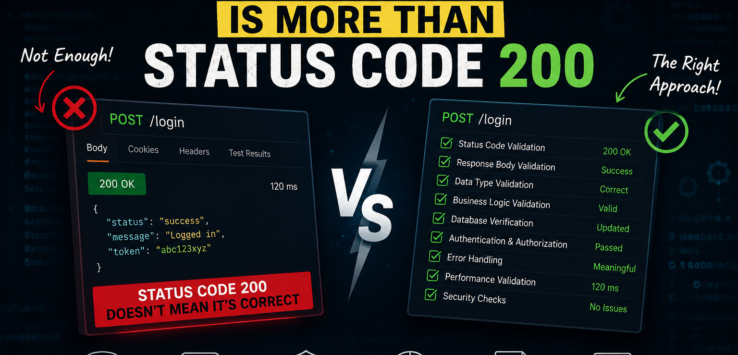
A Green Status Code Doesn’t Mean Your API Works.
One day, a junior QA engineer came to me with a big smile.
“All API test cases passed!”
I asked him,
“How do you know?”
He replied confidently,
“Every API returned Status Code 200.”
I smiled.
Then I asked him one more question.
“Did you check the response body?”
“No.”
“Did you validate the database?”
“No.”
“Did you verify whether the right user received the data?”
“No.”
“Then what exactly did you test?”
That conversation happened years ago, but I still remember it because it’s one of the biggest misconceptions in API testing.
Status Code 200 simply means the server processed your request successfully. It does NOT guarantee the business logic is correct.
Case Study 1 – The Customer Who Became Someone Else
Imagine you’re testing a Get Customer Details API.
GET /customer/101Response:
{
   "customerId":101,
   "name":"Rahul",
   "email":"rahul@email.com"
}
Status Code?
200 OK
Looks good.
But what if Customer 101 is actually Ramesh in the database?
The API returned someone else’s data.
The server is happy.
Your test passed.
The customer is not.
Always validate the business data, not just the status code.
Think Like a Tester, Not Like Postman
When testing an API, I always ask myself,
“If I were the user, what could go wrong?”
Here’s my checklist.
✅ Is the status code correct?
✅ Is the response body correct?
✅ Are all mandatory fields present?
✅ Are data types correct?
✅ Is the data coming from the right record?
✅ Is the response time acceptable?
✅ Was the database updated correctly?
✅ Are error messages meaningful?
✅ Is sensitive information exposed?
API testing is not about sending requests.
It’s about verifying the complete business flow.
Case Study 2 – Money Disappeared
A payment API returned:
HTTP 200 OKEverything looked perfect.
Later, finance teams discovered that customer balances were not updated.
Why?
The payment service completed successfully, but the database transaction failed silently.
The API said,
“Success.”
The database said,
“Nothing happened.”
If your testing stopped at Status Code 200, you would never find this production issue.
The Response Looks Correct… But Is It?
Consider a Login API.
POST /loginResponse:
{
   "status":"SUCCESS",
   "token":"ABC123XYZ"
}
Looks fine.
But ask more questions.
- Is the token unique?
- Does it expire correctly?
- Can another user use the same token?
- Can an expired token still access APIs?
- Is the token encrypted?
Great API testing begins where basic validation ends.
What Else Should We Test?
Here’s a simple checklist I teach every junior QA.
Functional Testing
- Correct response
- Correct business logic
- Correct data
Negative Testing
- Invalid input
- Missing fields
- Wrong HTTP method
- Invalid JSON
Security Testing
- Authentication
- Authorization
- Sensitive data exposure
- SQL Injection
- Token validation
Performance Testing
- Response time
- Large payloads
- Concurrent users
- Timeout handling
Data Validation
- Database updates
- Audit logs
- Message queues
- Cache updates
Every successful API call should leave the system in the correct state.
Case Study 3 – The Missing Audit Log
A banking application exposed an API to update customer addresses.
PUT /customer/addressThe API returned
200 OKAddress updated.
Everything passed.
A month later, auditors asked,
“Who changed this address?”
Nobody knew.
The API updated the customer record but never created an audit entry.
Functionally correct.
Business-wise, a serious defect.
Sometimes the most important validation isn’t even in the API response.
The Question I Always Ask
Whenever I finish API testing, I ask myself one simple question.
“If this API returns 200, what else should also be true?”
That’s where real testing begins.
Maybe the database should update.
Maybe an email should be sent.
Maybe an event should appear in Kafka.
Maybe another microservice should receive a message.
Maybe an audit log should be created.
Maybe nothing should happen.
Think beyond the response.
Think about the entire system.
Final Thoughts
Any tool can tell you whether an API returned 200 OK.
A tester tells the team whether the business actually worked.
Remember,
Status Code tells you the server responded.
Testing tells you whether the application behaved correctly.
And that’s the difference between running API requests and performing API testing.


Leave a Reply