
The Best Testers Don’t Just Test What Is Written. They Test What Can Go Wrong.
When I interview QA engineers, I ask one simple question.
“If all the requirements are implemented correctly, is testing complete?”
Most people confidently answer,
“Yes.”
My answer is always,
“Not even close.”
After spending more than 15 years in software testing, I’ve learned one lesson that completely changed the way I test.
Requirements tell you what the application should do. Reality tells you how users will actually use it.
And trust me…
Users never read requirements.
They don’t care about your design document.
They don’t know the business flow.
They simply click, type, refresh, close, reopen, double-click, go back, switch tabs, lose internet, paste strange data, and somehow find the one bug nobody imagined.
That’s why great testers don’t stop at requirements.
They test beyond them.
“I Tested Everything”… Did You Really?
A junior tester once told me,
“All 125 test cases passed.”
I asked him,
“Did you try refreshing the page during payment?”
“No.”
“Did you open the application in two browser tabs?”
“No.”
“Did you click Submit five times?”
“No.”
“Did you lose internet while saving?”
“No.”
“Did you test with 5,000 records?”
“No.”
Then what exactly did you test?
He smiled.
“I tested the requirements.”
Exactly.
That’s where many testers stop.
Experienced testers start from there.
Case Study 1 – The Double Payment Bug
An online shopping application had a simple requirement.
“Click Place Order to complete payment.”
Everything worked perfectly.
Automation passed.
Manual testing passed.
UAT passed.
Application went live.
Within two days, customers started complaining.
They were charged twice.
What happened?
One customer had a slow internet connection.
He clicked the Place Order button three times because nothing happened for a few seconds.
Three payment requests reached the server.
Three successful transactions.
Nobody tested impatient users.
The requirement never mentioned,
“User may click multiple times.”
But real users do.
The bug wasn’t in the requirement.
The bug was in understanding human behavior.
Think Like Different People
When I start testing, I become different people.
Sometimes I think like a happy customer.
Sometimes an angry customer.
Sometimes a careless employee.
Sometimes a hacker.
Sometimes a child.
Sometimes a senior citizen.
Every person uses software differently.
If you always think like the Business Analyst, you’ll only find requirement bugs.
If you think like users, you’ll find production bugs.
Case Study 2 – The Developer Was Right
A junior QA reported,
“Search is very slow.”
Developer replied,
“It works perfectly on my machine.”
Both were correct.
Developer tested with 50 records.
QA tested with 2 million records.
Requirement never mentioned data volume.
Production database had 15 million records.
After optimization, search time reduced from 18 seconds to less than one second.
Nobody violated requirements.
But only one person tested reality.
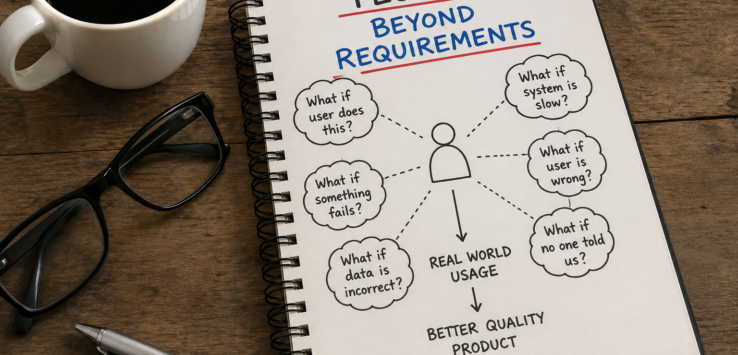
Testing Is About Asking “What If?”
Whenever I read a requirement, I ask myself one question.
What if…?
What if the user enters blank values?
What if the internet disconnects?
What if the server responds slowly?
What if the API returns NULL?
What if two users edit the same record?
What if session expires?
What if browser crashes?
What if the database is unavailable?
Every “What if” creates a new test idea.
Requirements give answers.
Testers should ask questions.
Case Study 3 – The Delete Button
Requirement:
User can delete a customer.
Simple enough.
Junior QA tested.
Customer deleted successfully.
Pass.
Now let’s think beyond requirements.
What if another user is editing that customer?
What if the customer has pending invoices?
What if deletion fails halfway?
What if someone clicks Delete twice?
What if the user accidentally deletes the wrong customer?
Should there be confirmation?
Undo?
Audit logs?
Permissions?
Suddenly one simple requirement becomes twenty different tests.
That’s how experienced testers think.
Observe Developers Too
Good testers understand developers.
Great testers understand how developers think.
Developers usually focus on making features work.
Testers focus on making features fail.
Neither is wrong.
They’re solving different problems.
Whenever a developer says,
“This situation will never happen.”
I quietly smile.
Because production users love proving developers wrong.
Not because developers are careless.
Because users are unpredictable.
The Best Bugs Never Exist in Documents
One production issue I still remember happened during a financial application release.
Everything worked perfectly.
Until one user changed the system date.
Suddenly reports started showing future transactions.
No requirement mentioned changing the computer date.
Nobody thought anyone would do it.
One customer did.
That single bug delayed financial reports for hundreds of users.
Since then, I learned something.
People don’t intentionally break software.
They simply use it differently.
Don’t Test Features. Test Experiences.
Instead of asking,
“Does Login work?”
Ask,
“What happens if login fails five times?”
Instead of asking,
“Can user upload a file?”
Ask,
“What happens if the file is 2 GB?”
Instead of asking,
“Can user reset password?”
Ask,
“What if the reset email arrives after ten minutes?”
Same feature.
Different mindset.
Much better testing.
My Rule After 15 Years
Whenever I finish testing a feature, I never ask,
“Did I cover all requirements?”
I ask,
“Can I confidently give this application to my parents, my child, or my least technical friend?”
Because they won’t use the application the way requirements describe.
They’ll use it the way humans behave.
And humans are beautifully unpredictable.
Final Thoughts
Requirements are your starting point.
They are not your finish line.
A good tester verifies what is written.
A great tester questions what is missing.
The day you stop testing documents and start understanding people, your entire approach to quality changes.
Because software is not built for requirements.
Software is built for humans.
And the best testers never forget the human behind every click.


Leave a Reply